

FAQ
Quick answers to the questions customers ask us most.
Which app do I use for my pack?
Just use Krishii ONE. You don’t need to remember which app goes with which pack.
- Open Krishii ONE and sign in.
- Tap Providers. You see only the apps in your pack.
- The line under each app tells you how it opens: “Open PlayboxTV” means Krishii ONE opens it through that app; “Browse titles” means you watch it right inside Krishii ONE.
- Or search for the movie. Its page shows Where to watch and Included in your plan.
Have both PlayboxTV and VZY? When a title is on both, you choose which platform plays it. Choose your platform
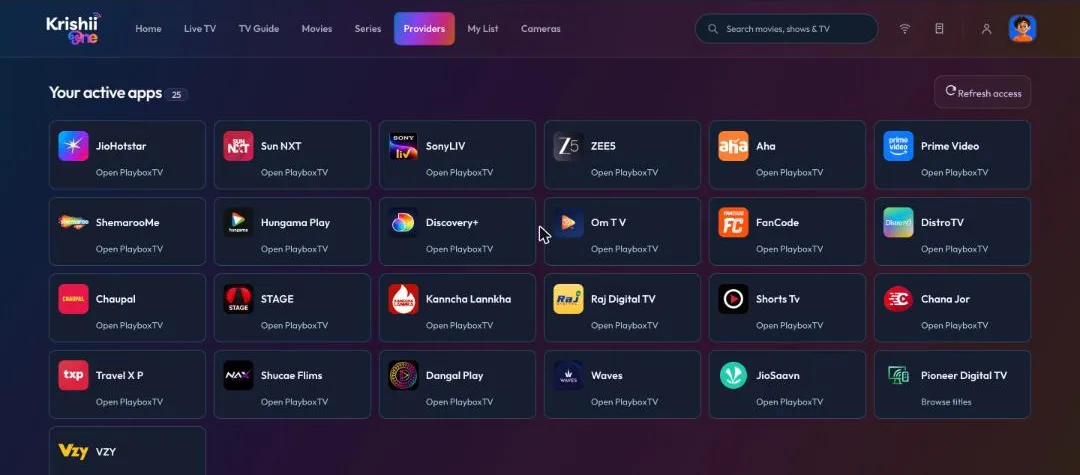
Your active apps: the answer to “which app?” for your own pack.
To see the packs themselves and their validity: My account → My account → Subscriptions.
I used OTTplay before. What now?
OTTplay has shut down. Install Krishii ONE and sign in with your Krishiinet account. Your pack’s apps are all there.
Do I pay extra for the 300+ channels?
No. The 300+ live TV channels come with Krishii ONE at no extra cost.
Can I use it on my phone, TV and laptop?
Yes. Install it on your Android phone and Android TV, and open krishii.one on a laptop. See Add a TV or another device.
I don’t have a smart TV or box. Can I still watch?
Yes. Open krishii.one on any laptop or computer, sign in and tap Live TV. Local TV channels play right in your browser. More
How do I stop kids watching adult content?
Give them the Kids profile and set a parent PIN. How Kids mode works
How do I change my WiFi password?
My account → My Wi-Fi → Edit Wi-Fi. Step by step
An app in my pack is missing
Go to Providers and tap Refresh access. Still missing? WhatsApp us with your account number.
A title won’t play
Check that the partner app shown on the card (for example PlayboxTV) is installed and updated on that device, then try again. If it still fails, run Network Health and raise a ticket from there.
How do I sign out a TV I gave away?
My account → My account → Devices → Sign out. More