

Krishii ONE Guide › Account & WiFi
Your WiFi
Change your WiFi name and password and see every connected device.
Change WiFi name and password
Go to My account → My Wi-Fi. You see the WiFi networks your router is broadcasting (2.4 GHz and 5 GHz). Tap Edit Wi-Fi to change the WiFi name (SSID) or the password.
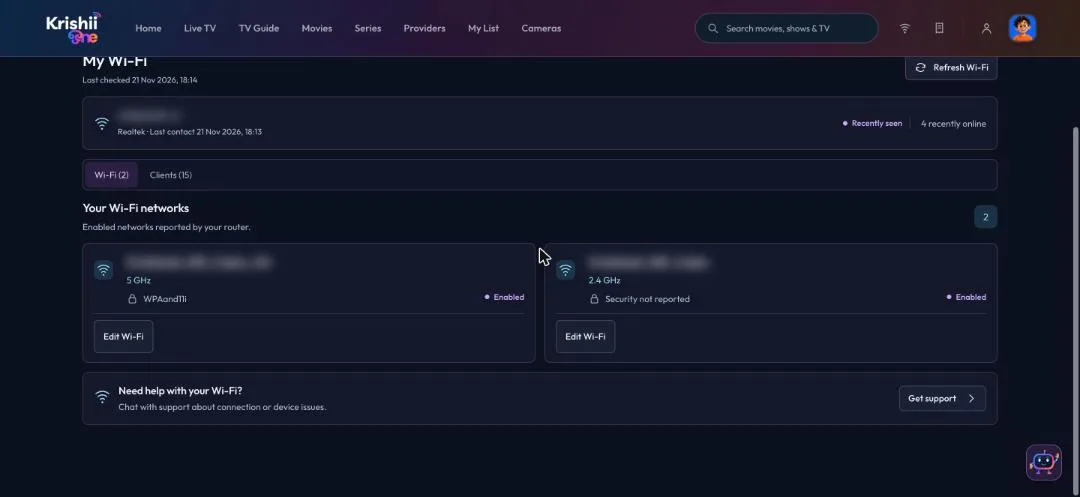
My Wi-Fi: your networks, with Edit Wi-Fi on each. Names are blurred here.
How does this work without a technician? Your Krishiinet router supports TR-069, a standard that lets the app update its settings safely over the network. Changes reach the router within a few minutes.
See who is on your WiFi
The Clients tab lists every phone, laptop and TV your router reports: online, offline and recently seen. Search the list to find one device.

Clients: every device your router reports. Device names are blurred here.
Block a device Coming soon
Soon you will be able to block a single device from your WiFi, as part of parental control.
Find Krishiinet WiFi hotspots Rolling out
Search for Krishiinet WiFi hotspots near you from the Krishii ONE app. This is rolling out now: if you don’t see it yet, update the app.